A Complete Guide to CloudStream Repositories and Extensions
CloudStream APK is one of the most loved streaming apps among users who enjoy watching movies, web series, and anime for free. What makes this app stand out is not just its smooth interface or high-quality playback, but its flexibility and ability to connect with different repositories and extensions.
These features allow users to access a massive library of global content from different streaming sources in one place. Instead of switching between multiple apps or websites, CloudStream brings everything under one roof.
Whether you love watching Hollywood movies, Japanese anime, Korean dramas, or live sports, CloudStream’s repositories and extensions make it possible to enjoy all of them without any subscription or complicated setup. Understanding how these repositories and extensions work can help you unlock the full potential of this incredible app.
What is CloudStream APK?
CloudStream APK is a free streaming application that lets users watch movies, TV shows, anime, and live channels without paying any fees. It works as a media player that pulls content from multiple online sources using extensions.
The app itself doesn’t host or store any video content instead, it connects users to available online links through repositories. CloudStream is lightweight, ad-free, and runs smoothly on Android, PC, and Smart TVs. Its customizable interface allows users to select layouts and subtitles based on their preferences.
With options to stream in 720p, 1080p, or even 4K resolution, CloudStream ensures a cinema-like experience at home, making it an excellent alternative to paid streaming platforms like Netflix and Disney+.
What are CloudStream Repositories and Extensions?
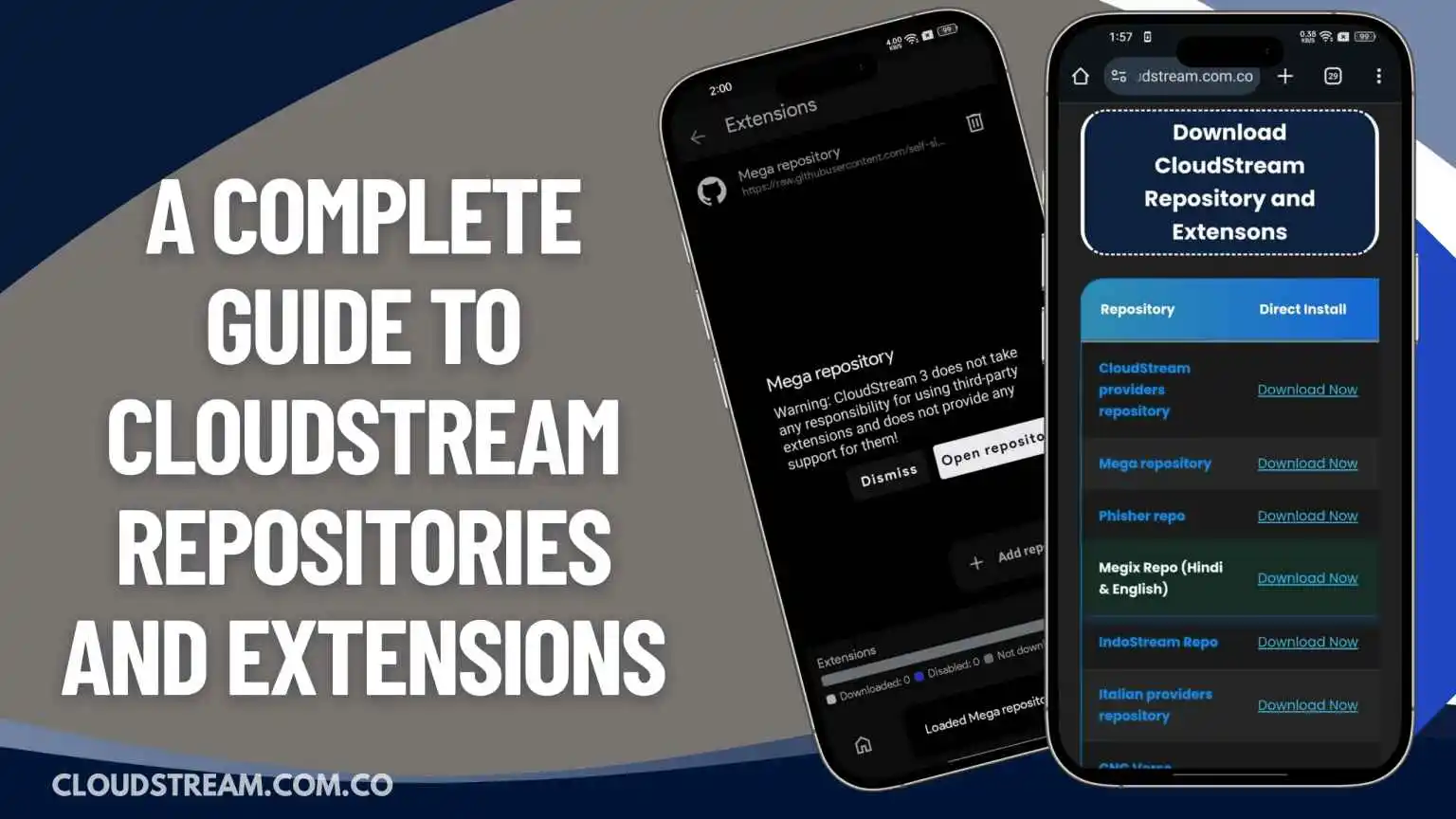
Repositories and extensions are the heart of CloudStream APK. Without them, the app would appear empty or show no content. Repositories act as libraries or collections of streaming sources that hold various extensions inside. These extensions, once added to CloudStream, connect the app to online servers that host movies, web series, or anime from different platforms.
When you first install CloudStream, you’ll notice the app has no pre-installed sources. You must manually add a repository link from a trusted source to start accessing content. For example, the “Mega Repository” or “CNC Repo (All Languages)” are popular repositories that include extensions for platforms like Netflix, Disney+, Hotstar, DooFlix, MovieBox, and more.
Each extension within a repository represents a different streaming source or category of entertainment. Once installed, CloudStream scans these extensions and displays available movies, series, and episodes. You can add as many repositories as you like to expand your content library.
The best part is that CloudStream keeps these repositories updated regularly, ensuring you always have access to the latest releases and stable streaming links. This system gives users complete freedom to customize what they want to watch, combining flexibility, speed, and reliability in one powerful tool.
Download CloudStream Repository and Extensons
| Repository | Direct Install | Shortcode |
|---|---|---|
| CloudStream providers repository | Download Now | cspr |
| Mega repository | Download Now | megarepo |
| Phisher repo | Download Now | phisherrepo |
| Megix Repo (Hindi & English) | Download Now | csx |
| IndoStream Repo | Download Now | indos |
| Italian providers repository | Download Now | ipr |
| CNC Verse repository | Download Now | cncv |
| Redowan’s BDIX repository | Download Now | redowan |
| German providers repository | Download Now | gpr |
| Saimuel Repo | Download Now | saim |
| CakesTwix Provider | Download Now | cakes |
| doGior’s Had Enough | Download Now | gior |
| Turkish Providers Repo | Download Now | kraptorcs |
| Luna712’s CloudStream extension repository | Download Now | luna712 |
| CuxPlug | Download Now | CuxPlug |
| DiziPal & TabiiSpor | Download Now | sarapcanagii |
| CloudStream Vietnamese | Download Now | viet |
| King | Download Now | kingl |
How to Add or Install CloudStream Repository and Extension?
For new users, installing and setting up CloudStream can feel a bit tricky. That’s why I’ve shared a step-by-step guide to help you install the app and add repositories and extensions easily.
Step 1. Download & Install CloudStream APK
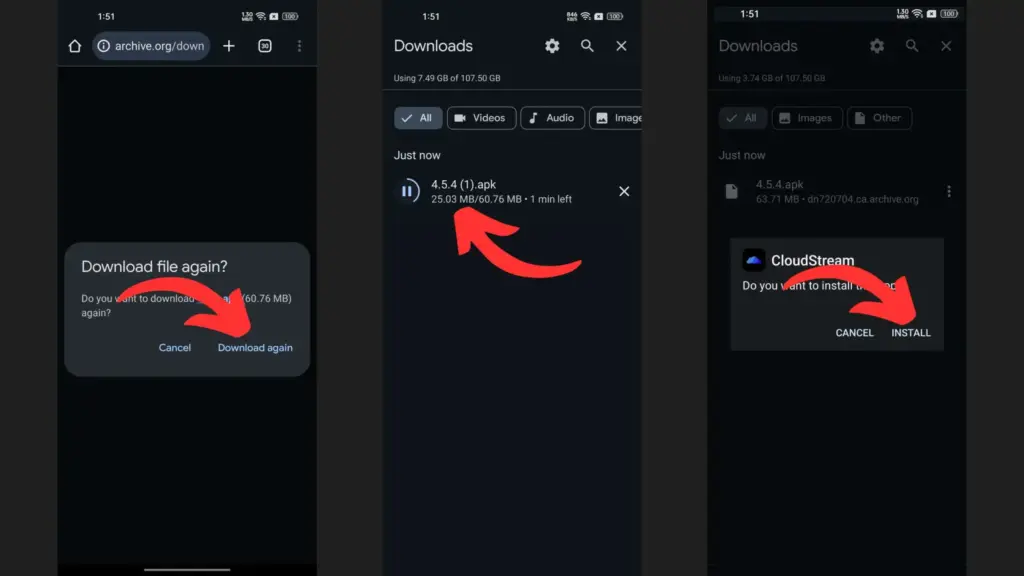
- Go to the official CloudStream download page and choose the latest APK version compatible with your device. Click the Download button to save the file.
- Wait for the APK to finish downloading, then open your device’s Settings. Navigate to Security & Privacy and enable Unknown Sources to allow installation from outside the Play Store.
- Open your File Manager and go to the Downloads folder. Locate the CloudStream APK file you just downloaded.
- Tap the APK file, read the prompts, and then press Install to begin installing the app on your device.
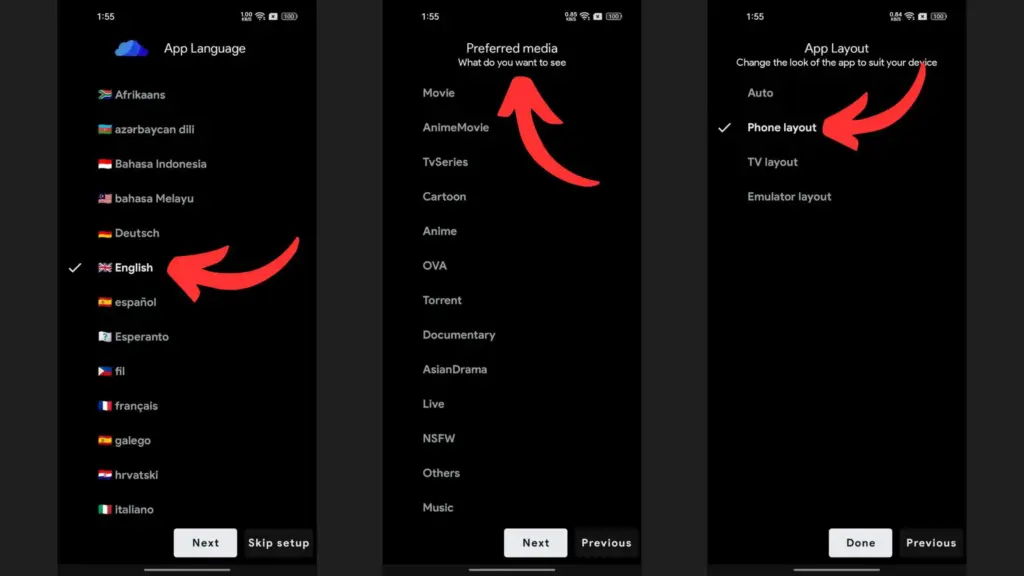
Step 2. Set up CloudStream
- After installing CloudStream, tap to launch the app on your device.
- Grant all necessary permissions for the app to work seamlessly, including access to storage, files, and network.
- You will need to choose the language for the app interface and also your favorite type of media such as movies or anime.
- Select the layout that matches your device — phone, tablet, or TV — to optimize the user experience.
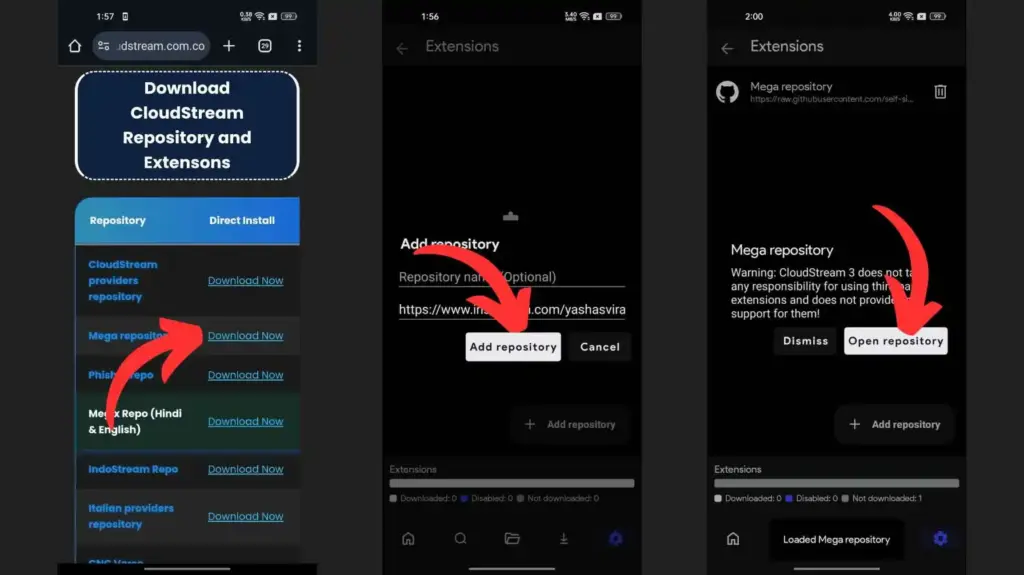
Step 3. Install Repository:
- Check the list of CloudStream repositories provided and select the ones you want to use.
- Click the Direct Install link to automatically open your chosen repository within the CloudStream application.
- Tap the ‘Open Repository’ button when it appears to add the repository into CloudStream’s library.
- Finally, click the Download icon beside the repository to install it and gain access to its content.
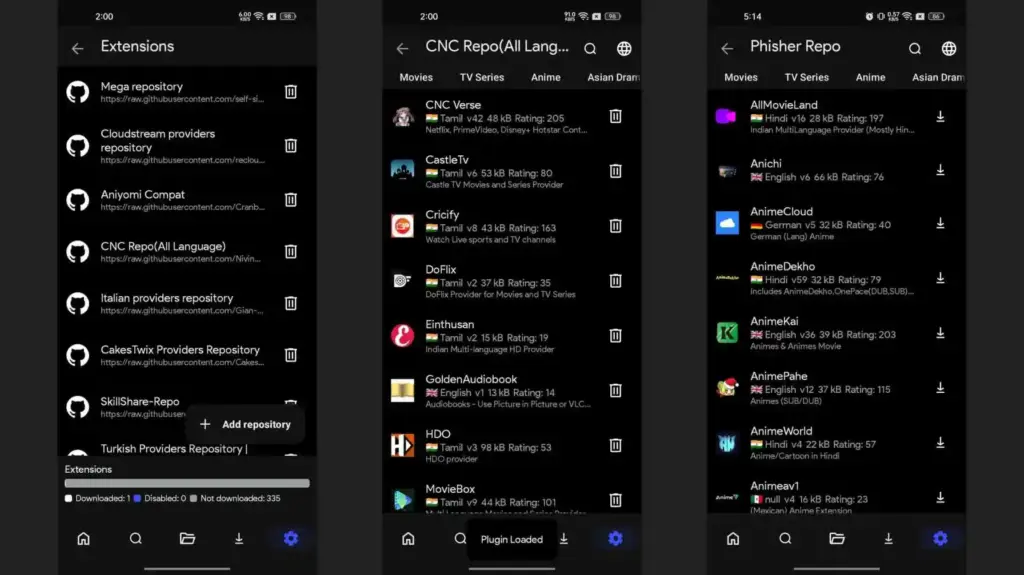
Step 4: Install Extension and Plugin:
- Navigate to CloudStream’s main page and select the Settings icon on the bottom right to enter the app’s settings section.
- Click on ‘Extension’ to display all extensions available, including those that were added through your new repository.
- Tap on the extension of your choice, then hit the Download icon to add it to CloudStream for immediate use.

Step 5: Enjoy Watching Movies & Series:
- Open CloudStream and go to the homepage. Look for the bottom-right floating button named ‘None’ and tap it to continue.
- You will now see a list of all extensions and plugins that you installed earlier through repositories.
- Choose any extension to get access to thousands of movies, TV shows, web series, and anime for unlimited streaming.
- Use the search function to locate a specific title and click the ‘Play’ button to start watching your desired content instantly.
Why Repositories and Extensions Matter
Repositories and extensions make CloudStream different from other streaming apps. Instead of limiting users to one platform or a small content library, it connects to multiple sources simultaneously. This means you can watch Netflix originals, Disney+ shows, or even regional content all in one app, without switching between platforms or paying separate subscriptions.
Extensions are also lightweight and safe to use, as they only fetch links rather than store data locally. This keeps your device’s storage clean and performance smooth. Regular repository updates ensure fresh links, better playback speed, and fewer broken connections.
Simply put, repositories and extensions make CloudStream a flexible, open-source entertainment hub — one that adapts to your preferences and delivers an unlimited world of streaming possibilities.
![CloudStream APK For PC Download for Windows/MAC [2025]](https://cloudstream.com.co/wp-content/uploads/2025/10/Cloudstream-APK-For-PC-Download-768x432.webp)