Best CloudStream Extensions for Movies, Series, Anime & Live TV
CloudStream has become one of the most popular free streaming apps because it offers a clean, fast, and ad-free way to watch movies, web series, anime, and TV shows. Unlike many other free streaming apps, CloudStream does not come with content already built in. When you open it for the first time, you may notice that it looks empty. This is completely normal and also what makes CloudStream special.
CloudStream works in a smart way by using something called extensions. These extensions connect the app to different websites on the internet and bring streaming links directly into the app. This system gives users more control, more content choices, and better reliability. Instead of depending on just one source, CloudStream can use many sources at the same time.
Because of this, choosing the right extensions is very important. The right extensions can give you high-quality videos, fast loading links, and a huge collection of movies, shows, anime, and even live TV channels. In this article, we will explain what CloudStream extensions are, why they are important, how to install them, and which extensions are best for different types of content like movies, web series, anime, and live TV.
About CloudStream Extensions
CloudStream extensions are small plugins that add content sources to the app. They are the main reason CloudStream is able to show movies, series, and other videos. CloudStream itself does not store or host any content. It only works as a player and a content browser.
Each extension connects to one or more websites and brings streaming links into CloudStream. Some extensions focus on movies, some on web series, some on anime, and some on live TV. You can install many extensions at the same time, and CloudStream will search all of them when you look for something to watch.
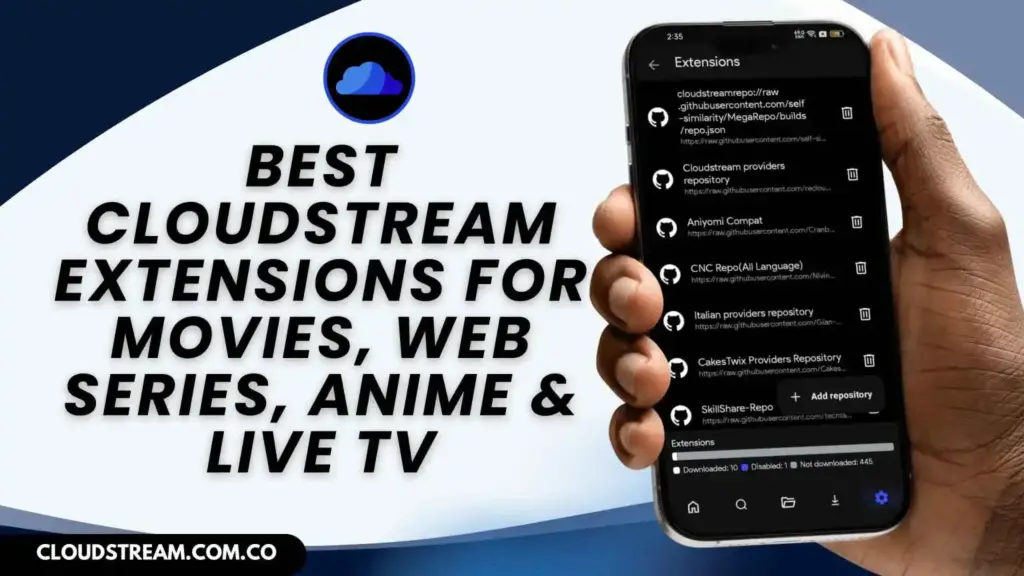
Extensions are provided through repositories, which are like small stores inside CloudStream. You add a repository, and then you can install extensions from it. This system makes CloudStream very flexible. If one extension stops working, you can simply install another one. This is why CloudStream is more reliable than many other free streaming apps.
Why Extensions Matter
Extensions are the heart of CloudStream. Without them, the app cannot show any movies or shows. They decide what content you can watch, what quality is available, and how fast the links load.
One big advantage of extensions is that they give you multiple sources for the same content. If one source is slow or broken, another one may work. This reduces the problem of “no links found” and broken videos.
Extensions also help you get better quality. Some extensions provide 720p, 1080p, or even 4K streams. Others may focus on fast servers that work well on slow internet.
Another important reason extensions matter is content variety. You can install movie extensions, anime extensions, and live TV extensions all in the same app. This means you don’t need many different apps for different types of content. Everything stays in one place, making CloudStream simple and powerful.
How to Install Extensions in CloudStream (Step-by-Step)
CloudStream does not show any movies or shows by default because it works using extensions. These extensions bring content into the app from different sources. Installing extensions is very easy and only takes a few minutes. Follow the steps below carefully to start watching movies, web series, anime, and live TV on CloudStream.
Step 1: Open the CloudStream App: First, make sure CloudStream is properly installed on your device. Open the app from your home screen or app drawer. Wait a few seconds for it to load completely. Once the app opens, you will see the main home screen. From here, you can access all settings and features needed to install extensions.
Step 2: Go to the Settings Menu: On the CloudStream home screen, look for the Settings icon, usually located in the corner of the screen. Tap on it to open the settings menu. This is where you can manage repositories, extensions, player settings, and other important options of the app.
Step 3: Open the Repositories or Extensions Section: Inside the Settings menu, scroll down until you find the Repositories or Extensions option. Tap on it to open the extension management page. This section shows all the repositories and extensions that are currently installed on your CloudStream app.
Step 4: Add a Repository Link: Now, look for the Add Repository or Add Source option and tap on it. A box will appear where you can paste the repository link. Enter a trusted repository link from a reliable source and confirm it. CloudStream will now add that repository to the app.
Step 5: Open the Repository: After adding the repository, go back to the repositories list and tap on the newly added repository. It will open and show you a list of available extensions. These are the extensions you can install to get movies, web series, anime, and live TV content.
Step 6: Choose and Install the Extensions: Scroll through the list of extensions and choose the ones you want. Tap on the Download or Install button next to each extension. CloudStream will download and install them automatically. Wait a few seconds until the installation is completed.
Step 7: Go Back to the Home Screen: Once the extensions are installed, go back to the CloudStream home screen. You may see a button or option to select an extension. Choose any installed extension to start browsing content.
Step 8: Start Watching Your Favorite Content: Now you can search for movies, TV shows, anime, or live channels. CloudStream will use the installed extensions to find streaming links for you. Just select a video, choose a link, and press play to start watching.
Best CloudStream Extensions for Movies
Megix Repo extensions are perfect for watching Hollywood and international films. Good movie extensions usually offer multiple servers, different video qualities, and fast loading links. With the right movie extensions installed, you can easily find new releases as well as old classic films in high quality.
Best Extensions for Web Series & TV Shows
CNC Verse Repository Extensions for web series and TV shows help you watch episodes from many platforms in one place. These extensions usually organize content by seasons and episodes, making it easy to continue watching where you left off. They are great for binge-watching and often provide multiple links for each episode in different qualities.
Best Extensions for Anime
Phisher Repo extensions are made specially for anime fans. They offer both subbed and dubbed anime, including popular series and new episodes. These extensions usually have good subtitle support and organized categories. With the right anime extensions, you can watch almost any anime series without using a separate app.
Best Extensions for Live TV & Sports
CloudX Repository extensions let you watch news channels, entertainment channels, and live sports events. These extensions are useful for people who want to watch matches or live programs without cable TV. They usually provide multiple channel options and work best with a stable internet connection.
Are CloudStream Extensions Safe?
CloudStream extensions are safe as long as you install them from trusted repositories that is given on our homepage. They do not host content, they only fetch links from the internet. For better privacy and security, it is recommended to use a VPN and avoid unknown or suspicious repositories.
Conclusion
CloudStream extensions are what make the app powerful and useful. They allow you to watch movies, web series, anime, and live TV all in one place. By choosing the right extensions and keeping them updated, you can enjoy a smooth, high-quality, and ad-free streaming experience on CloudStream.


![CloudStream APK For PC Download for Windows/MAC [2025]](https://cloudstream.com.co/wp-content/uploads/2025/10/Cloudstream-APK-For-PC-Download-768x432.webp)